I wanted to deploy my portfolio somewhere fast and genuinely easy to set up, and Cloudflare kept coming up as the answer. But the more I looked into how Cloudflare Workers actually runs code, the more I realized “serverless” was hiding a lot of interesting engineering. So before deploying anything, I went down a rabbit hole — and this is what I learned.
Context: How We Got Here
To understand why Workers exist, it helps to look at what came before it.
- Static CDNs. For a long time, CDNs were great at one thing: caching and serving static files (images, HTML, CSS) close to the user. Fast, but not “smart” — no dynamic code, no logic, just files.
- Serverless (AWS Lambda-style). Serverless functions solved the “I need to run dynamic code” problem, but introduced two new ones: cold starts (spinning up a fresh execution environment is slow) and geography (your function usually lives in one region, far from users on the other side of the world).
- Cloudflare Workers. Workers is essentially the marriage of both worlds: serverless-style dynamic code, running at CDN-level edge locations globally, with cold starts fast enough that Cloudflare markets them as 0ms — thanks to something called V8 Isolates.
The Problem It’s Actually Solving
Strip away the marketing, and the real problem is this: running dynamic code close to the user, without paying the cold-start tax.
Traditional serverless platforms solve “dynamic code” by spinning up a full sandboxed environment per request — often a container with its own mini operating system. That sandboxing is exactly what makes it safe to run untrusted code from thousands of different customers on shared infrastructure. But it’s also what makes it slow to boot and heavy on resources, so providers pin it to a handful of regions instead of running it everywhere.
Workers needed a way to keep that safety — isolating one user’s code from another’s — without paying for a full OS boot every time.
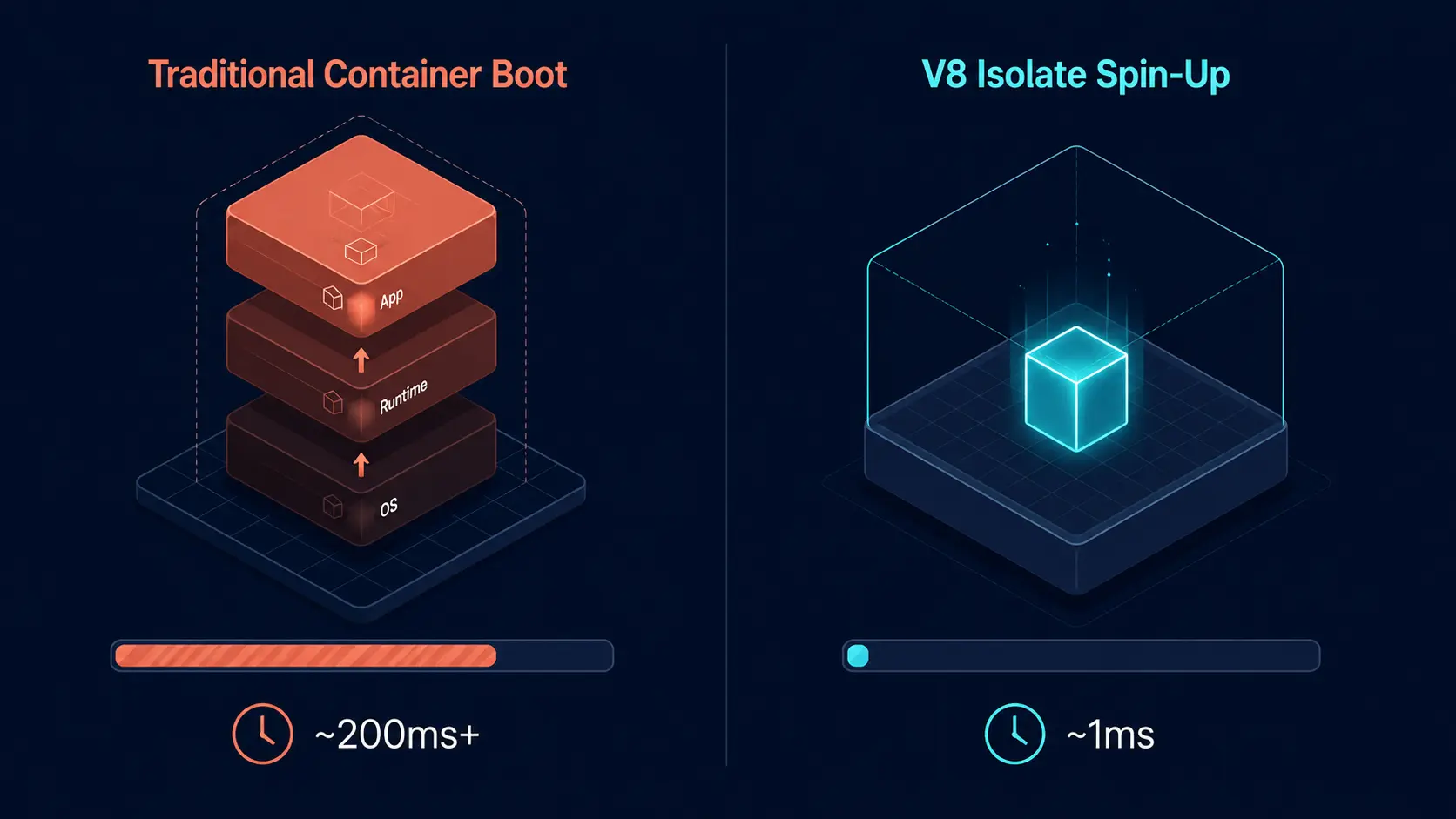 Traditional container boot vs. V8 Isolate spin-up.
Definition: What Cloudflare Workers Actually Is
Cloudflare Workers is a serverless platform that runs your JavaScript/TypeScript code inside V8 Isolates at Cloudflare’s edge locations worldwide, instead of inside traditional containers or VMs in a handful of regions.
The key word is Isolates. It’s the same isolation model Google Chrome uses to keep browser tabs from interfering with each other — except Cloudflare repurposes it to keep different customers’ code safely separated on the same machine, without giving each one a full virtual OS.
How Workers Work Under the Hood
A few things make this model click once you see them together:
- Same engine as Chrome. Workers runs on the V8 engine — the same one powering Chrome. Chrome uses Isolates to sandbox browser tabs from each other; Cloudflare uses the exact same mechanism to sandbox one customer’s code from another’s.
- No OS, no containers. A Worker never boots a virtual machine or a Docker container. There’s no operating system to initialize. That’s the whole reason it’s so light on memory and so fast to start — there’s simply less to start.
- The “move-in-ready building” model. Think of Cloudflare’s edge servers as a building that’s already fully constructed and powered on, 24/7 — the V8 engine is always running. When a request arrives, Cloudflare doesn’t build a new building; it just clears out one empty room (an Isolate) in about a millisecond and hands it your code.
Here’s the actual request lifecycle:
- You run
deploy, and your code is pushed to Cloudflare’s edge servers around the world. - A request hits your app. V8 allocates an Isolate — an isolated memory space — and loads your code into it to handle that request.
- If more requests come in shortly after, the same Isolate can stay “warm” in RAM to handle them too, avoiding repeated startup cost.
- Once requests stop coming, the Isolate is destroyed (garbage collected) to free up memory — with no lingering boot cost hanging over the next request.
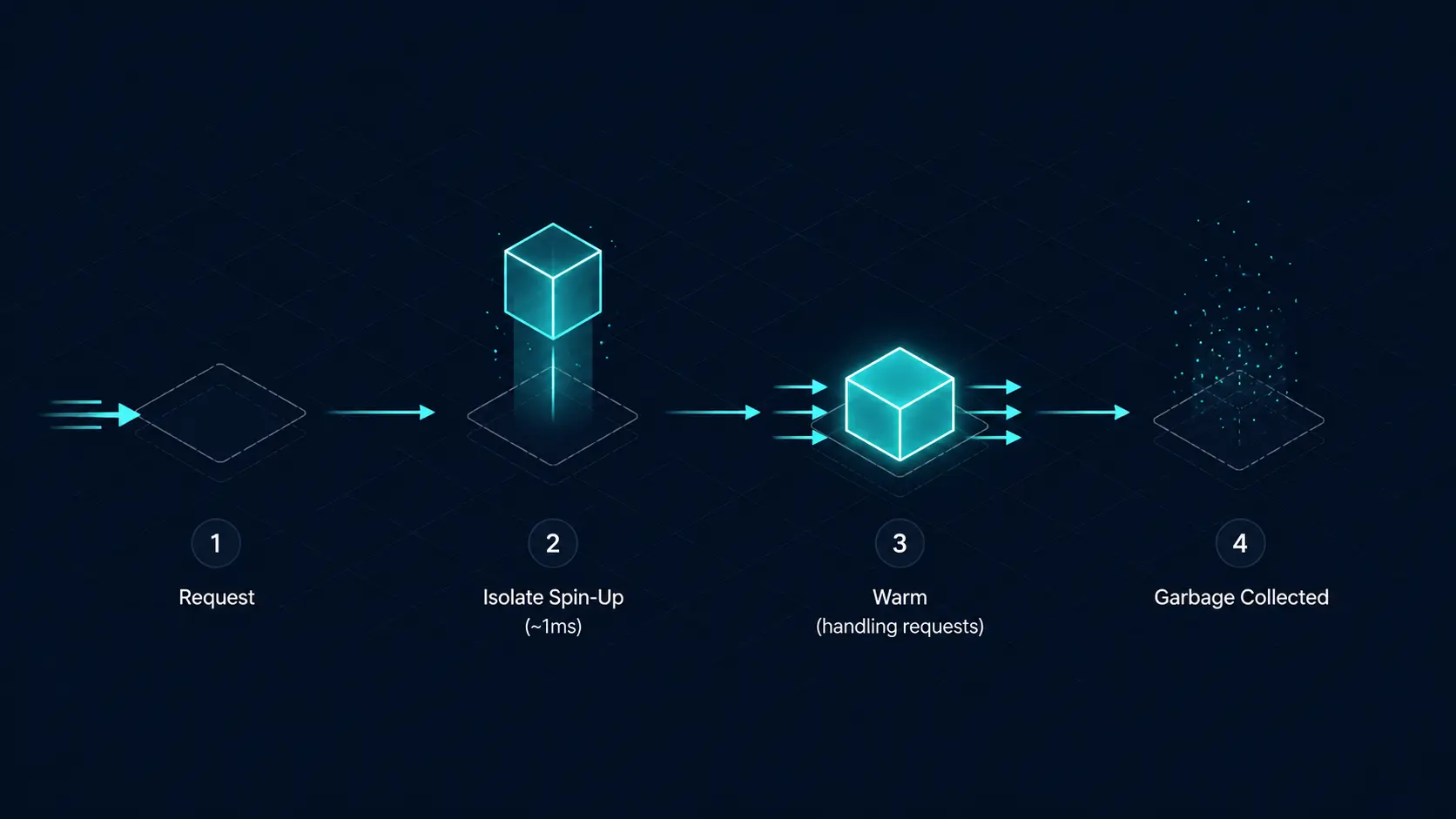 The Isolate lifecycle: spin-up, warm, garbage collected.
Static CDN vs. Traditional Serverless vs. Workers
| Static CDN | Traditional Serverless (e.g. Lambda) | Cloudflare Workers | |
|---|---|---|---|
| Runs dynamic code | No | Yes | Yes |
| Isolation unit | N/A | Container / micro-VM | V8 Isolate |
| Cold start | N/A | Slow (100ms–1s+) | Near-instant (~ms) |
| Location | Edge (global) | Regional | Edge (global) |
Why This Matters for My Portfolio
None of this would matter much if I were just serving static files — a plain CDN handles that fine. But I wanted room to add small dynamic pieces later (an API route, a redirect rule, maybe a contact form handler) without switching platforms or babysitting cold starts. Workers gives me that flexibility while staying about as easy to set up as a static host, which was the whole reason Cloudflare came up in the first place.
Key Takeaways
- Workers exists to close the gap between “static CDN” (fast, but dumb) and “serverless” (smart, but slow to start and far from users).
- The trick isn’t magic — it’s swapping heavyweight OS/container isolation for lightweight V8 Isolates, the same tech Chrome uses to sandbox tabs.
- No OS to boot means no cold-start tax, which is what lets Cloudflare run your code at the edge, everywhere, instead of in one region.
I’m planning a follow-up post that goes one level deeper into how the V8 engine itself works, since that turned out to be the real foundation this whole model rests on. For now — next step is actually deploying this portfolio on Workers and seeing how the theory holds up in practice.